
A practical guide for shoppers in the United States. Prices and store policies in our example were observed on November 10, 2026; they can change.
The best Black Friday deal isn’t necessarily the one with the biggest number in red. It’s the thing you were already happy to buy, at a price that makes sense, from a seller you can deal with if something goes wrong.
That sounds obvious until you have six tabs open, a countdown ticking and a laptop advertised at 40% off. Is that discount unusual? Is the cheaper listing actually new? And if the seller sends the wrong model, who takes it back?
Here’s a way to answer those questions before you hand over your card.
The five-minute deal check
Before you buy, answer these five questions:
- Would I want this item at its ordinary price? If not, decide what problem it solves before looking at the discount.
- Is it the exact model I want? Check capacity, screen, size, color and condition. A cheaper variant is not always the same product.
- Is the price genuinely useful to me? Look at its history when available and check at least one other seller. Compare the delivered total, not just the sticker price.
- Who sells it, and can I return it? A marketplace’s logo can sit above an offer from a completely different business.
- How will I pay and resolve a problem? Use the platform’s checkout and an eligible payment method with protections you understand.
If you can’t answer one of these, slow down. A ticking clock is a poor substitute for a return policy.
Start with a shopping list, not the sale page
Write down the things you actually need and what each one must do. For a monitor, that might be “27 inches, 1440p, fits my desk and has the input my laptop needs.” For an SSD, it might be “2 TB, compatible with my computer, and enough space for the games I play.”
Then set two numbers: the maximum you can comfortably spend in total, and a target price that would make you happy to buy. Leave room for tax, delivery and any essential adapter or cable. If the device only works for you after a $40 accessory, that $40 belongs in the budget.
Add one or two acceptable alternatives. You don’t need to decide that only one model in the world can make you happy. But decide what you can compromise on before a retailer chooses for you: color may be negotiable; a laptop’s soldered RAM or a monitor’s input might not be.
An unexpected offer can still be a good buy. Give it a short pause and ask: What will I use it for, and what planned purchase would its cost replace? Saving $80 on something you didn’t need still leaves you with the money you spent.
What does “40% off” actually mean?
A percentage tells you how the seller’s current price compares with a particular reference number. It doesn’t, on its own, tell you whether that item was routinely sold at the reference price, whether another store is cheaper, or whether the price drops every few weeks.
There are several useful comparisons:
| Question | What it tells you |
|---|---|
| Current price versus the crossed-out price | The saving against the stated reference |
| Current price versus recent history | Whether this is low compared with prices recorded before |
| Current price versus other stores today | Whether a comparable offer is cheaper elsewhere |
| Price versus a suitable alternative | Whether another product solves the same problem for less |
A recurring sale isn’t necessarily a bad deal. If the item fits your needs and budget, a price that returns regularly can still be a comfortable time to buy. It just may not justify abandoning your plan because a banner says the offer is unique.
As an illustration, imagine a monitor advertised at $350 instead of $500. The arithmetic is a 30% reduction from the stated $500 reference. If your price tracker also shows the monitor repeatedly at $350–$390, the more useful conclusion is that $350 is a recurring sale price, not proof of a once-a-year opportunity. These figures are an example, not an observed store listing.
Don’t assume a store intentionally inflated a price merely because the reference is higher than what you saw last month. Ask what the reference represents, then compare the amount you would actually pay.
A real deal check: the same headphones, three different views
We followed a real product through a price tracker and two marketplace pages: Sony WH-1000XM6, black, Amazon ASIN B0F3PQHWTZ. This is an example of the checking process, not a current recommendation or a claim that we tested the headphones. Availability and prices can change.
1. Start on the product page
On November 10, 2026, Amazon’s US page showed $378, described as 18% below a $459.99 list price. We set the delivery location to New York ZIP 10001. The listing offered free delivery for the displayed option, but we did not complete checkout or verify the final tax-inclusive total. The selected new offer showed Amazon.com as shipper/seller when we inspected it.
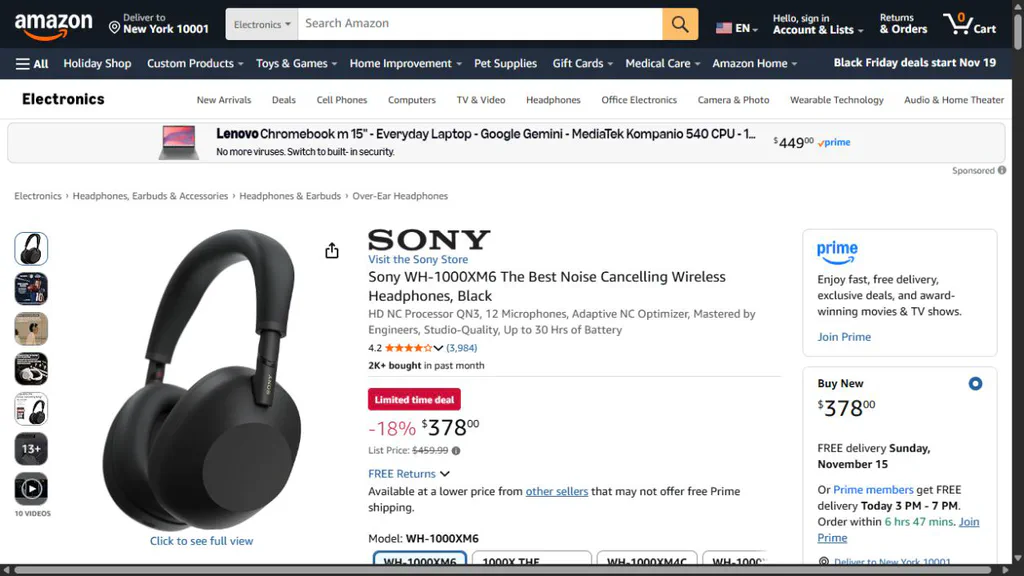
Amazon listing captured November 10, 2026. The list price is a reference, not evidence that $459.99 was the recent everyday selling price. Taxes and final checkout were not verified.
The 18% calculation tells us the advertised reduction, but it doesn’t tell us whether $378 is unusual. Next stop: price history.
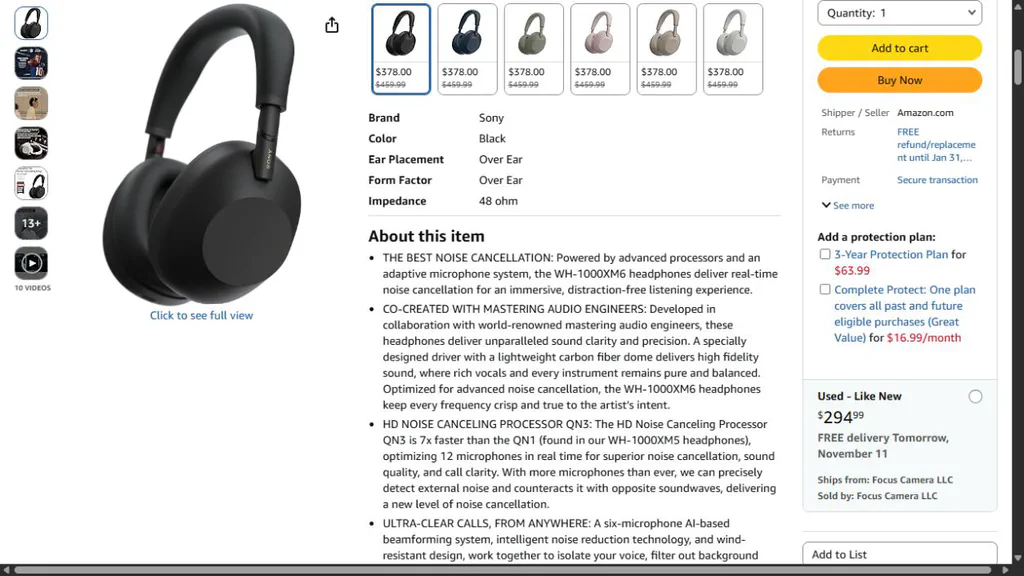
The offer panel identifies the seller and shipper separately from the product brand. Optional protection plans add cost and should be assessed separately.
2. Open the history and choose the right line
We opened the matching CamelCamelCamel page and checked the ASIN and black model. The page distinguishes Amazon, third-party new, and third-party used prices. The green line in our screenshot is the Amazon series: the tracker defines it as a product sold and shipped by Amazon itself.
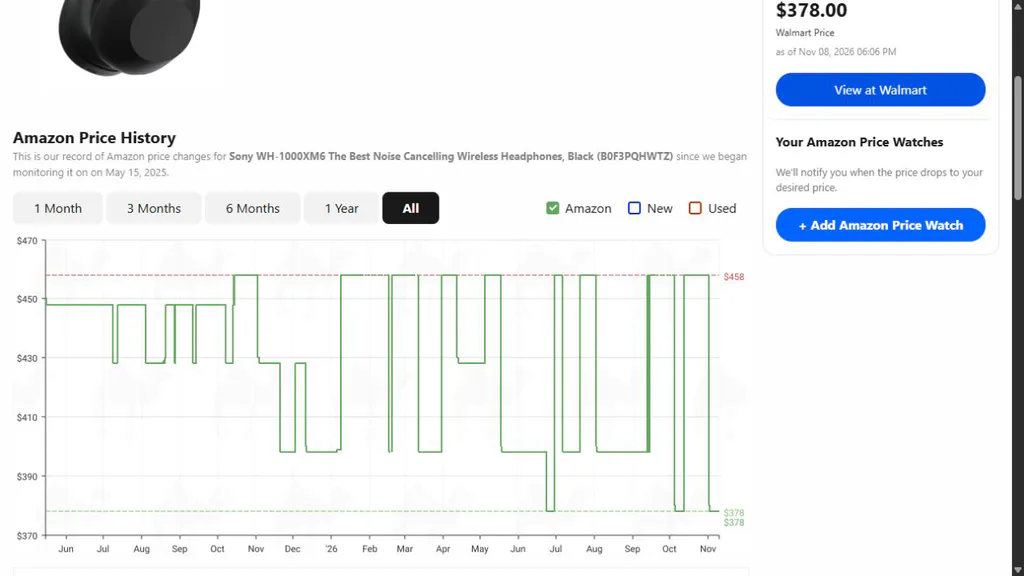
CamelCamelCamel record captured November 10, 2026. The selected Amazon series is distinct from third-party new or used offers.
The tracker showed an Amazon-series low of $378, dated November 2, 2026, and an average of $427.47 over its recorded history. Its chart also showed earlier dips near the same level. That makes $378 worth a closer look for someone already planning this purchase, but not a reason to assume the offer is unique or will never return. The tracker showed its last recorded Amazon price change on November 2; check the store for the actual offer before buying.
The historical low for third-party new was $368. That’s a different seller category, not proof Amazon itself previously sold it for $368. Used offers form yet another line. A tracker can miss coupons or short offers, and a historical low doesn’t predict next week’s price.
3. Follow the second-store offer all the way to its condition
The tracker also displayed a $378 Walmart price. The corresponding CamelMart record described its Walmart price series as sold and shipped by Walmart and showed the same product UPC, 027242930698. Its displayed price change was dated November 2. So far, this looks like a useful lead, not a finished comparison.
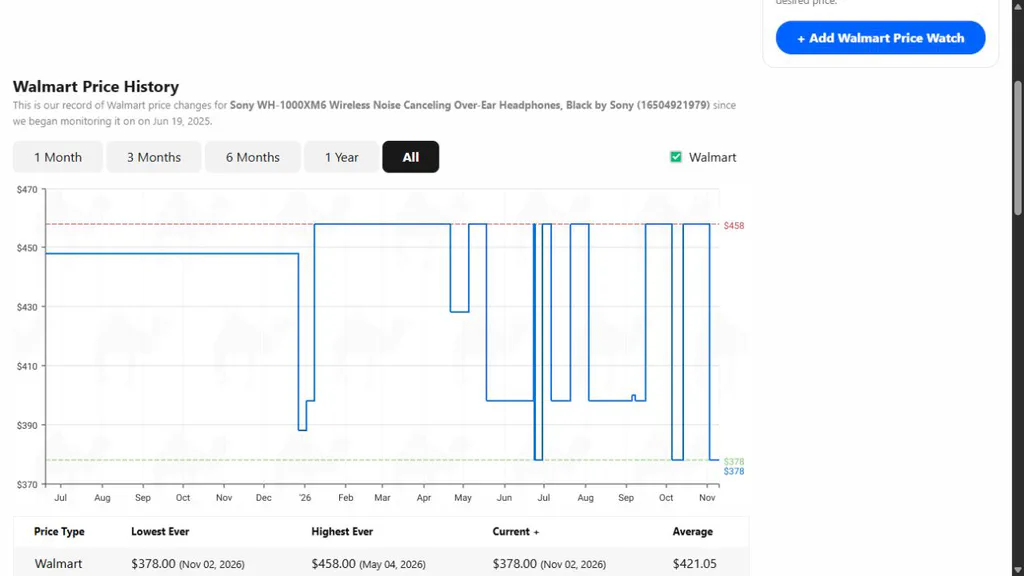
CamelMart capture, November 10, 2026. A tracker entry is a lead; inspect the exact offer on the retailer page.
Following the retailer link gave us a different selected offer: the Walmart page opened on a pre-owned, like-new pair at $366.36, sold and shipped by Focus Camera. The page also showed a new option at $378, but its seller and final terms still needed checking. The Walmart listing used ZIP 95829, while the Amazon listing used 10001; delivery and taxes could differ.
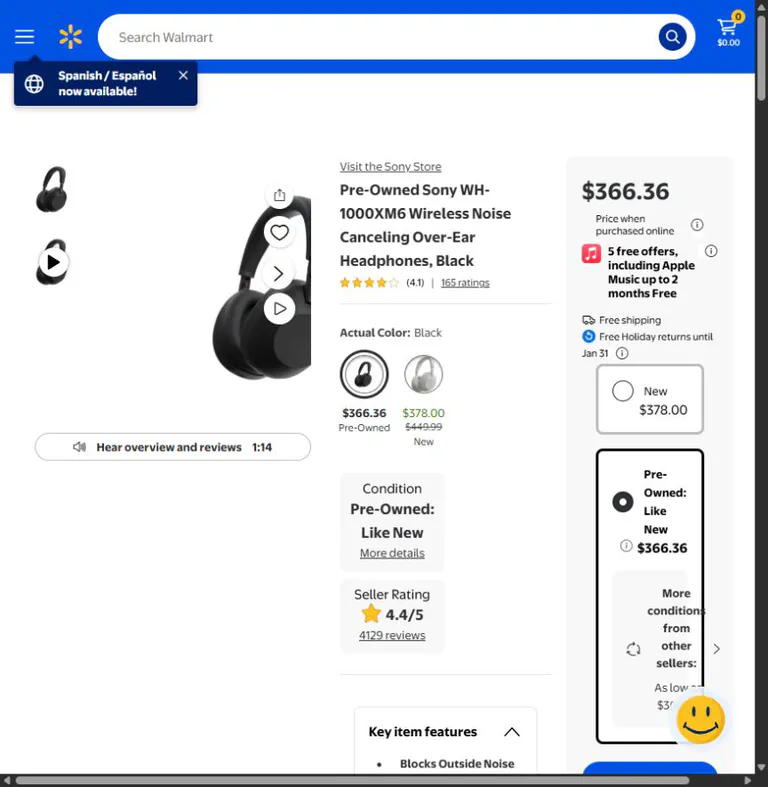
Walmart listing captured November 10, 2026. The selected pre-owned offer and seller differ from the tracker’s Walmart-sold series. The displayed new option was not independently verified after selection.
The decision: if you want a new black pair, don’t treat the $366.36 pre-owned listing as an $11.64 saving on the same terms. Confirm the condition, seller, delivery address, returns and total first. If you’re open to used headphones, decide whether the saving is enough for you after checking the seller’s condition description and warranty.
This is also why a tracker doesn’t make the decision for you. A correct historical line and a real product page can still describe different offers.
A second example: 39% off does not mean a record-low price
Suppose you’ve planned a 2 TB internal SSD upgrade and have already checked that your computer accepts an M.2 NVMe drive. On November 10, 2026, the Amazon page for the Samsung 990 PRO 2TB, model MZ-V9P2T0B/AM, showed a new unit at $389.99, compared with a $639.99 list price and a displayed saving of 39%. The offer was shown as sold and shipped by Amazon.com to our New York 10001 setting, with free standard delivery. We didn’t complete checkout or verify tax.
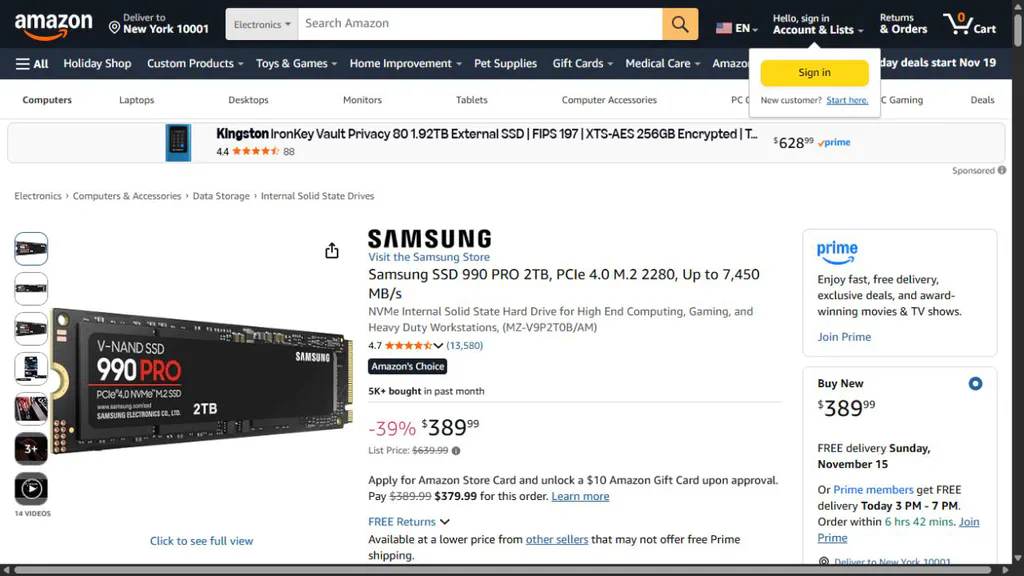
Amazon listing captured November 10, 2026. The discount is against the stated list price; the final tax-inclusive cost wasn’t checked.
Now open this exact drive in CamelCamelCamel, select Amazon and choose 1 Year. Its chart showed $389.99 as the last recorded Amazon price change on November 2, and a one-year low of $169.98. It also showed a substantial change in prices during the year. The graph is a record from this tracking service, not a complete record of every store, coupon or brief promotion.
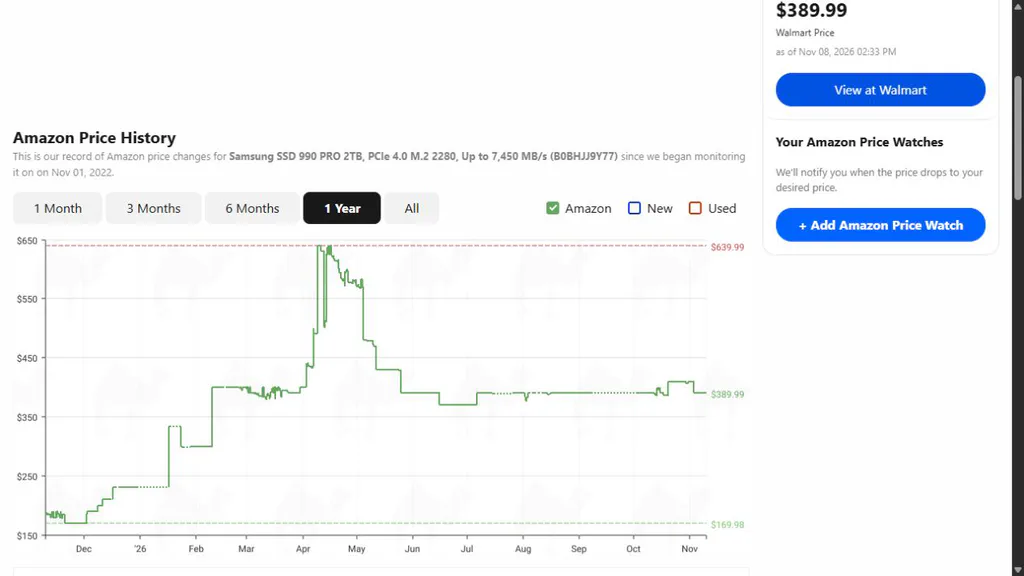
CamelCamelCamel capture, November 10, 2026. The selected line follows Amazon-sold prices; it does not predict where SSD prices go next.
What does that change? The advertised arithmetic is roughly right: $389.99 is about 39% below $639.99. But it was well above this tracker’s one-year low and had been near the $390 level for stretches of the more recent chart. That doesn’t prove the reference price is improper, or that $169.98 will return. It does mean “39% off” isn’t enough to call the purchase an unusually cheap one. If you need storage immediately, compare current compatible drives and choose on today’s total and terms. If you can wait, set a price that makes sense for your budget instead of assuming the old low is guaranteed to reappear.
Even the search results need care. A search for “990 PRO 2TB” also surfaced a 9100 PRO and a 990 PRO with a heatsink. They are different products, with different compatibility and prices. Verify the exact model, capacity and whether the heatsink fits your system before comparing.
How to use price-history tools without being misled
CamelCamelCamel: look up an Amazon item
- Copy the product URL or search the exact model at CamelCamelCamel.
- Match the product title and ASIN, the identifier Amazon uses for a listing. Check the variant; a black 2 TB model isn’t automatically the same listing as a silver 1 TB version.
- Select a useful time range. Start with three months, then check a year or all available history if the product is older.
- Read the Amazon, third-party new and third-party used series separately. Use the one matching the offer you want.
- Look for repeated dips, not just the lowest number. Then return to the retailer and verify current price, condition, seller and checkout terms.
The service describes its charts and email price watches in its feature guide. It tracks Amazon listings, not every offer on every store. A graph is an aid, not an independent guarantee of the current transaction price.
Google Shopping: compare the market and look for insights
Search the exact product and open its Shopping product page. Where available in the US, Google’s price insights can show whether a price appears low, typical or high and how it changed in recent months. Google’s instructions explain where to find it.
Use the result to discover sellers and a possible price range. Then open each offer: verify the model, condition, merchant, shipping and total. Not every product has insights, and a label based on available data cannot promise that prices won’t fall again.
Keepa and browser tools
Keepa is another source of Amazon price-history data; its documentation describes product histories and offers. Before installing an extension or paying for a service, check which features are currently free, what permissions it requests, and whether it covers your marketplace and model.
Chrome can show shopping insights and price tracking on eligible pages, depending on region and settings. Google explains the requirements in its Chrome help page. Tracking can require account and browsing settings you may prefer not to enable. You can still compare prices manually.
No tool sees everything. Coupons, member prices, local availability, marketplace sellers, shipping and tax can differ from the line on a chart. If a tool has no useful history, don’t invent one: compare today’s offers and note that the historical question remains unanswered.
Compare the bill, not just the badge
Try this small calculation before checkout:
Item price − immediate discount + delivery + tax + required accessories or fees = expected total.
If the store offers a mail-in rebate or future store credit, write it on a separate line. Money you might receive later, subject to conditions, isn’t the same as an immediate price reduction. A gift card is only worth its face value to you if you’ll actually use it before it expires and can spend it on what you need.
Here’s an illustrative comparison, before tax:
| Offer | Item and delivery | What to check |
|---|---|---|
| Store A | $380 + $0 = $380 | New item; confirm return terms |
| Store B | $350 + $20 = $370 | Check seller and the cost of any required membership |
| Store C | $360 + $0 = $360 | $20 rebate is separate and may require a claim |
If Store B requires a new $15 membership you wouldn’t otherwise buy, its effective cost for this purchase is $385 before tax. Store A may then cost less. If you already use that membership, don’t automatically assign its entire cost to this single order. These are invented examples to show the arithmetic, not live offers.
Installments need a separate look too. A small payment every two weeks is still a commitment to the whole amount. Check due dates, potential fees and how returns are handled before choosing a buy-now-pay-later plan. The CFPB notes that missed payments can lead to fees or other consequences.
Same product? Check the details that change the answer
Retailers sometimes have slightly different model numbers for products that look nearly identical. That’s not automatically suspicious. It does mean you should check:
- Laptop: processor, RAM, storage, display and whether memory can be upgraded.
- TV or monitor: full model number, size, resolution, panel and inputs.
- SSD: capacity, interface, form factor and whether you need a heatsink.
- Headphones and phones: generation, color, condition, included accessories and region compatibility.
- Any marketplace listing: new, open box, refurbished or used, plus who actually sells it.
A discounted laptop with half the memory isn’t automatically a better buy than the apparently more expensive model. Price comparisons only work after you understand the difference. For help deciding what fits, see our guides to SSDs, gaming monitors and used or refurbished laptops.
Spot the shopping traps: which ones are scams?
Some offers are simply poor value; others are designed to steal your money or information. Treat the latter as a reason to stop, not a discount to negotiate.
The copycat store
An ad shows the right brand logo and an unbelievably cheap device. The link leads to a site whose name is almost, but not quite, the retailer’s. The FTC warns that impersonation ads can take shoppers to sites that send a counterfeit item, something different, or nothing at all. FTC holiday-shopping advice.
What to do: don’t rely on the ad link. Open the retailer’s known site or app yourself and search for the model. Check the seller’s name and web address, then search for independent complaints. A padlock only means the connection is encrypted; it doesn’t prove the business is honest.
“Pay me outside the marketplace”
A seller promises a better price if you send a wire, crypto payment, gift-card code or payment-app transfer outside the marketplace. The move can strip away the marketplace protections you were counting on. The FTC’s marketplace guide advises keeping payment inside the platform.
What to do: use the eligible checkout shown by the marketplace. If the seller insists on moving the transaction elsewhere, walk away. A payment app isn’t inherently fraudulent, but a stranger’s insistence on an irreversible or personal transfer is a strong warning.
The misleading seller badge
The page has a familiar marketplace logo, thousands of product reviews and a “shipped by” label. None of those alone tells you that the marketplace itself sold the unit, that the seller is an authorized dealer, or that a manufacturer will honor a warranty in your region.
What to do: find both sold by and shipped by. Open the seller’s profile, review the listing-specific return policy and verify warranty eligibility with the manufacturer when it matters. Product reviews and seller reviews answer different questions. Reviews can be manipulated; even plausible-looking ones aren’t proof of authenticity. FTC on online reviews.
The fake delivery text
After a real shopping spree, a message says your parcel is stuck and asks for a small redelivery fee. That timing can feel convincing.
What to do: open the order from the retailer’s known site or app and follow its tracking link. Don’t enter card details through an unexpected text. The FTC explains this delivery-message scam.
The fake support or refund call
Someone calls about a suspicious order or offers to help recover money after a bad purchase. They may ask you to install remote-access software, share a one-time login code, or pay a fee before receiving the refund. A convincing logo or a caller ID that looks familiar doesn’t prove the call is genuine.
What to do: end the conversation and contact the retailer or bank through the number on its official app, your card or its established website. Never share a one-time login code with an unsolicited caller. A company promising to recover your money for an upfront fee is another warning sign. See the FTC’s guide to refund and recovery scams.
The gift card that has already been emptied
Gift cards can be legitimate presents. They can also be tampered with before purchase, or used by a fake seller who asks for the number and PIN as payment. Once the code has been redeemed, recovering the balance can be difficult.
What to do: buy from a trusted seller, inspect physical packaging for damage or exposed codes, keep the receipt, and never give a gift-card code to someone who demands it as payment. If something is wrong, contact the card issuer promptly using its official contact information. The FTC explains how gift-card scams work.
Countdown timers, bundles and “free” extras
A timer, a free gift or a subscription offer may be legitimate. It can also make a deal look better than it is. A bundle only helps if you want the included items; a subscription trial can become a recurring charge; “limited quantity” doesn’t explain whether an equivalent offer will appear again.
What to do: remove optional extras from the calculation, read renewal terms and check the standalone product. Don’t treat a countdown as evidence of an unusually low price.
Pick a purchase route you can actually use
No payment method or platform can promise a refund in every case. Think of protection as several different routes, each with its own rules.
| Route | What it can help with | Check before paying |
|---|---|---|
| Store return | An eligible return under that seller’s policy | Deadline, condition, return shipping and exceptions |
| Manufacturer warranty | A covered defect during the warranty period | Eligible seller, territory, duration and exclusions |
| Marketplace protection | An eligible order that doesn’t arrive or differs from the listing | Payment on-platform, eligibility and claim deadline |
| PayPal purchase protection | Certain eligible missing or significantly misdescribed purchases | Eligible payment, exclusions and deadlines |
| Credit-card dispute | Certain billing errors or purchase disputes | Your issuer’s process, evidence and applicable deadline |
Changed your mind? That’s not the same as receiving a broken or misdescribed product. The return policy for a change of mind may be narrower than the remedy available for a seller’s mistake. Read the actual listing and keep a copy: “free returns” on one item doesn’t automatically cover another.
PayPal is not a blanket warranty. In its current US purchase-protection terms, personal Friends and Family payments are excluded. For an eligible item not received, the stated dispute window is 180 days from payment. For an item significantly not as described, the policy states 30 days from delivery or 180 days from payment, whichever comes first. There are other exclusions and conditions; return shipping may not be covered. Recheck the terms at purchase.
For certain US credit-card billing errors, the CFPB says you generally need a written notice within 60 days after the first statement showing the error to protect your rights. A defective item can involve a different process. Contact your issuer promptly and follow its instructions; don’t assume a dispute guarantees a refund.
If you pay through a marketplace, read how its own claim process interacts with card or payment-provider disputes. For example, eBay’s policy says a case can be closed if the buyer also files a chargeback or another buyer-protection claim for the same transaction. Check your deadlines before deciding which route to use, and don’t let a slow seller consume a time limit.
What to save before and after ordering
You don’t need a detective’s case file. One folder per important purchase is enough:
- Before paying: save the item description, exact model, stated condition, seller name, promised delivery and return terms.
- After paying: save the order confirmation, receipt, final amount and any promotion or rebate instructions.
- When it arrives: check the model and included accessories, inspect for damage, and test the features you actually bought it for while the return window is open.
- If there’s a problem: photograph the issue and retain packaging where useful; keep correspondence in the marketplace or by email so you have a record.
- If the price falls: check whether the seller offers a price adjustment and whether your offer qualifies. A general promise to match prices may have exclusions for marketplace, refurbished or Black Friday deals. Best Buy’s policy is one example; check the version in force when you buy.
Don’t share photos of receipts publicly without removing payment and personal information.
Something went wrong. What now?
The package hasn’t arrived. Check the order and real tracking page. Contact the seller using the original platform. If it doesn’t resolve the issue, check the marketplace’s claim process and your payment provider’s deadlines. Save the promised delivery date and messages.
You received a different or damaged item. Photograph what arrived, compare it with the saved listing and open the correct return or “not as described” request. Don’t label it merely “changed my mind” if the seller sent the wrong model. Follow the platform’s return instructions and keep the tracking receipt.
You entered card details on a suspicious site. Contact the card issuer using the number on the card or its official app. Explain what happened and follow its instructions. Change a reused password if you entered one, and watch the account for unauthorized transactions.
You already paid a suspected scammer. Contact the payment company or bank immediately and ask whether it can stop or reverse the payment. Report the seller or listing to the platform. In the US, suspected fraud can also be reported at ReportFraud.ftc.gov. A report helps authorities; it does not itself guarantee recovery.
A few questions worth asking
Are Black Friday prices always the lowest of the year?
No. Some offers are unusually low; others return several times or are beaten later. A price history can help you recognize a good past pattern, but it can’t predict a future price or see every offer.
Is a recurring discount fake?
Not automatically. It may be a real reduction from a stated reference and still be a price that comes back regularly. The useful question is whether the final price and conditions work for you now.
Should I buy early or wait until Friday?
If a planned purchase reaches your target price with acceptable seller and return terms, buying early can be reasonable. Waiting can also be reasonable if you don’t need it yet. Stock and future prices are unknown, so decide how much uncertainty you’re comfortable with rather than following a universal rule.
What if a price tracker has no history?
Check the exact item at other retailers, compare a suitable alternative and record today’s total. You can make a decision without a graph; you just can’t honestly claim the price is historically low without evidence.
Does a well-known marketplace mean a safe purchase?
It can offer useful processes for eligible transactions, but individual offers may be sold by third parties with different conditions. Check the seller and pay through the platform. No badge removes the need to read the listing.
When a deal is worth buying
Keep the item on your list, the total inside your budget and a route back if the order goes wrong. If the offer survives those checks, a discount is a welcome bonus. If it doesn’t, closing the tab is a perfectly good Black Friday decision.