
The best mechanical keyboards in 2026 are not all trying to solve the same problem.
That sounds obvious until you start shopping. One tab says Hall Effect is the future. Another says gasket-mounted budget boards now sound like customs. A third tells you a low-profile wireless board is the grown-up answer. Then a review site ranks a full-size aluminum tank, a gaming site crowns a magnetic switch board, and a forum thread tells you the software is the real villain.
All of those can be true.
So I would not start with the question “What is the best mechanical keyboard?” I would start with the regret you are trying to avoid. Do you hate loud switches? Need a numpad? Play competitive shooters? Move between a MacBook and a desktop? Want the nice keyboard sound without spending $250? The right answer changes fast once the job is clear.
Use the May 20, 2026 price cues below as a shopping map, not a checkout promise. Color, switch, barebone/assembled variants, coupons and seller stock can change the real answer.
The Short Answer
Keychron Q1 Max if you want one premium board for work and play
It is the clean default because it combines an aluminum 75% body, hot-swap mechanical switches, QMK/VIA-style remapping, 2.4GHz wireless, Bluetooth and wired USB-C without being trapped inside a gaming-only ecosystem.
Retailer and manufacturer buttons are there to verify the exact configuration and return path. Treat the checkout page as part of the product. A keyboard with a great spec sheet and a painful return policy is not a great buy.
Keyboard finder and switch sound check
Answer five buying questions, then compare real CC0 keyboard recordings before you commit to a board. The sound library is directional, not a lab recording of every exact model below.
The clean default: premium feel, 75% desk fit, wireless modes, hot-swap switches and QMK/VIA-style remapping without a gaming-only ecosystem.
Skip it if you need Rapid Trigger for serious FPS play or a numpad every day.
Read the matching pickExact keyboard sound changes with case, keycaps, desk mat, foam and switch brand.
Linear switches are the clean no-click baseline. This CC0 sample is a Keychron K10 recorded one meter behind the user, so it captures desk and room sound too.
Source: Sadiquecat on Freesound, CC0. These recordings compare real keyboard sound families; they do not prove the exact sound of Keychron Q1 Max, Wooting 80HE, Logitech G515, NuPhy Air75 V2, AULA F75 or ASUS ROG Azoth Extreme.
What Changed in 2026
Mechanical keyboards used to be mostly a switch choice: red, brown or blue. Smooth, bumpy or loud enough to become a workplace incident.
That is no longer the whole story. The market moved in three directions at once.
First, Hall Effect and newer magnetic switch designs became mainstream for gaming. Wooting’s 80HE is the cleanest example: Wooting lists the standard 80HE at $199.99, with Hall Effect switches, Rapid Trigger and true 8kHz polling. RTINGS also points to the Wooting 80HE as its gaming pick in the mechanical keyboard category, while PC Gamer’s March 2026 update names it the best gaming keyboard on its list. That does not mean every writer, accountant or office worker needs magnetic switches. It means competitive players now have a real reason to care about actuation and reset behavior.
Latency note: do not buy a keyboard only because the box says 8000Hz. RTINGS treats latency as the whole input chain, not a single marketing number: connection mode, debounce, actuation point, rapid-trigger settings and consistency all matter. For most desks, good wired or 2.4GHz performance is enough; for serious FPS play, the useful upgrade is the Hall Effect/Rapid Trigger control around the polling number, not the number by itself.
Second, the budget market got weirdly good. Gasket mounting, pre-lubed switches, PBT keycaps, hot-swap sockets and tri-mode wireless used to sound like an enthusiast checklist. Now you can find a lot of that under $100. The EPOMAKER x AULA F75 is the obvious example: the official page describes it as a 75% gasket wireless mechanical keyboard, and the appeal is not subtle. It sounds and feels more expensive than the price suggests. The catch is software, firmware and seller discipline. Cheap magic is still cheap magic.
Third, software became a buying criterion. QMK/VIA-style remapping, web configuration, onboard profiles and less invasive setup are now real advantages. Big gaming suites can still be powerful, but they can also be heavy, noisy and annoying. Nobody wants a keyboard app behaving like a second operating system.
Do This Desk Check First
Before you compare model numbers, do a five-minute desk check. It prevents most bad keyboard purchases.
- Put your mouse where you actually play or work. If a full-size board pushes it too far right, do not buy full-size just because it has more keys. If you are also upgrading your pointing device, check our gaming mouse guide.
- Decide whether other people will hear the board. Shared room, calls, dorm, office or sleeping partner nearby means no clicky switches.
- Count the devices you switch between. One desktop is easy. Laptop plus desktop plus tablet means wireless mode, profile switching and OS key legends matter.
- Be honest about gaming. If you play competitive shooters seriously, Hall Effect and Rapid Trigger can matter. If you mostly type, they are not automatically better.
- Check whether you can live with the software. A great-feeling board with awkward firmware or a heavy vendor app can become annoying after the first week.
That is why the picks below are not ranked by hype. They are ranked by the regret they avoid: desk space, noise, latency, firmware, travel height, numpad needs and overpaying for luxury.
See what disappears when the keyboard gets smaller
Pick a form factor and look at the missing zones before you buy the clean desk photo.
Translate That Into a Pick
The easiest way to buy the wrong keyboard is to buy the one that looks best in a ranking and ignore the daily detail that will bother you every time you sit down.
Start with these questions instead:
- Will anyone else hear this keyboard? If yes, avoid clicky switches and aggressive sound profiles.
- Do you use a numpad every day? If yes, do not buy a 65% board because the desk photo looked clean.
- Do you play competitive shooters seriously? If yes, Wooting-style Hall Effect features matter more than “thock.”
- Do you switch between a work laptop, personal desktop and tablet? If yes, tri-mode wireless and profile switching matter.
- Do you hate installing vendor software? If yes, prioritize QMK/VIA-style boards or a mature web configurator.
- Are you buying a budget import board? If yes, buy from a seller with easy returns and verify the exact layout before firmware updates.
The keyboard hobby loves vocabulary. That is fine. Vocabulary is fun. But comfort is not vocabulary. A great board for a Valorant player can be a weird choice for a writer who wants tactile feedback and a quiet room. A gorgeous full-size aluminum board can feel like desk furniture if your mouse hand needs space.
Software has the same trap. QMK/VIA-style boards are usually better when you want remaps, layers and settings that travel with the keyboard. Vendor apps are often easier for RGB, game profiles and one-brand setups, but they can also mean background services, Windows-first support and more lock-in.
| Software route | Best for | Main advantage | Watch out |
|---|---|---|---|
| QMK/VIA-style | Work, multi-OS desks, layered remaps | Browser-style setup, onboard profiles, less app dependence | Not every board exposes every feature cleanly |
| Vendor suite | RGB, game macros, brand ecosystem | Friendly presets and deeper device integration | Can be heavy, Windows-first or required for basic changes |
Mechanical vs Membrane: When the Cheaper Keyboard Is Right
A membrane keyboard is not automatically a bad keyboard. It is usually the right answer when you want something quiet, cheap, spill-tolerant, easy to replace, and boring in the best possible way.
Pick membrane or a slim scissor-switch board if the keyboard is for a shared office, classroom, family computer, point-of-sale desk, guest setup, or kid’s machine where low noise and low replacement cost matter more than switch feel. Also consider it if you type lightly and do not want to think about switches, stabilizers, firmware, keycaps, foam, or software.
Pick mechanical if one of these is true: you type for hours and care about feel, you want a smaller layout without losing quality, you need hot-swap or remapping, you play latency-sensitive games, or you want the keyboard to be repairable and customizable instead of disposable.
The trap is buying a mechanical board just because it sounds premium. A loud clicky board can be worse than a basic membrane keyboard in a dorm room or office. A cheap membrane board can be better than a bargain mechanical board with bad firmware, rattly stabilizers, and no return path.
Use this quick rule:
So the real comparison is not “mechanical good, membrane bad.” It is control, feel and repairability versus quiet, low-cost simplicity. Buy the one whose tradeoffs match the desk.
Best Picks in Detail
Best Premium Default: Keychron Q1 Max
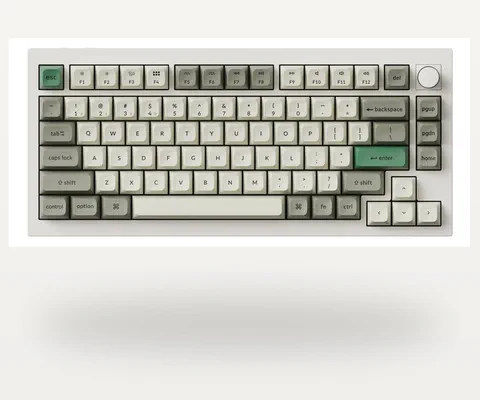
Keychron Q1 Max
The strongest all-rounder here: aluminum body, 75% layout, hot-swap switches, wireless, wired and remapping flexibility without turning the desk into a gaming shrine.
- 75%
- Aluminum
- 2.4GHz / BT / USB-C
- Hot-swap
The Keychron Q1 Max is the board I would price first for a buyer who wants something premium, flexible and not too specialized.
At the May 20 check, Keychron’s official page showed the Q1 Max family from $189.99 to $229.99 depending on barebone/assembled configuration, color and switch. The important specs are the 75% layout, aluminum body, hot-swap support, 2.4GHz/Bluetooth/wired connectivity, 1000Hz polling over 2.4GHz and wired, a 4000mAh battery, acoustic foam layers and double-shot PBT keycaps depending on variant.
Why it makes sense: it is a serious mechanical keyboard first. You can write on it, work on it, remap it, game casually or competitively enough for most people, and keep it on a desk without feeling like you bought a toy spaceship.
Why not: it is heavy, expensive compared with value boards, and availability can be awkward. If you mostly play shooters and care about Rapid Trigger, buy Wooting instead. If $200 feels silly for a keyboard, it probably is for your use case.
If this board is going next to a laptop most of the day, the same price discipline applies there too: our MacBook Air buying guide uses the same boring-but-useful logic around storage, ports and return windows.
Best Competitive Gaming Pick: Wooting 80HE
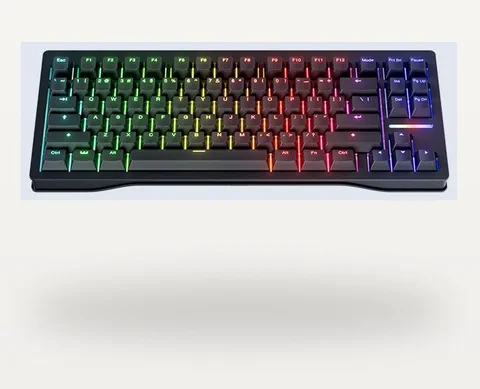
Wooting 80HE
Buy this when Rapid Trigger, per-key actuation and Wootility are the reason you are shopping. It is a performance tool first.
- Hall Effect
- Rapid Trigger
- 8kHz
- Wired
The Wooting 80HE is not the universal best keyboard. It is the board to buy when the keyboard is part of your movement mechanics.
At the May 20 check, Wooting’s official page showed the 80HE family at $199.99 and $219.99 variants, with Hall Effect switches, Rapid Trigger and true 8kHz polling. RTINGS calls it an outstanding gaming keyboard with very low latency, and its April 24, 2026 changelog notes improved input granularity after a firmware update. PC Gamer’s March 2026 gaming keyboard update also put the Wooting 80HE at the top of its gaming list.
That evidence points in one direction: if you play Valorant, Counter-Strike, Apex, osu! or other games where fast reset and actuation tuning matter, Wooting is the cleanest recommendation.
The caution is equally clear. Do not buy it because you saw a scary phrase like “8kHz” and assumed email would feel better. Buy it because you will actually use Wootility, Rapid Trigger and per-key actuation. Also be careful with SOCD/Snap Tap-style features. Rules vary by game, platform and tournament. Keep game-specific profiles and check current rules before treating any input-assist feature as harmless.
Best Full-Size Alternative: Keychron Q5 Max
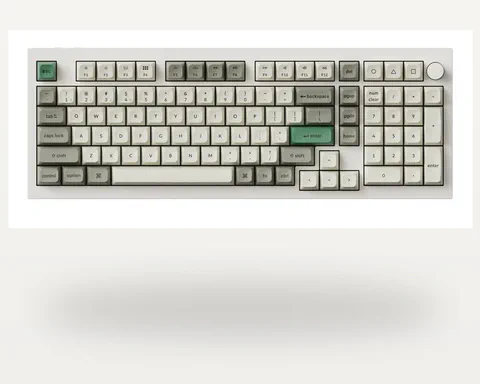
Keychron Q5 Max
The sensible premium move if you enter numbers every day. It keeps a numpad while avoiding the full desk sprawl of a classic 100% board.
- 96%
- Aluminum
- 2.4GHz / BT / USB-C
- QMK/VIA-style
Some people really do need a numpad. Accountants, spreadsheet people, CAD users, data-entry workers and anyone who enters a lot of numbers should not let the internet shame them into a tiny board.
The Keychron Q5 Max is the clean upgrade path. Keychron lists it as a full-metal QMK wireless custom mechanical keyboard with 2.4GHz wireless, 1000Hz polling and multiple acoustic foam layers. RTINGS names the Q5 Max as its top full-size mechanical keyboard pick.
It is still not a true old-school 100% slab. The 96% layout keeps the numpad while shrinking the footprint. That matters because a full-width keyboard pushes your mouse farther right, which can quietly make your shoulder hate you.
Why not: the Q5 Max is not cheap, and it is overkill if your numpad use is occasional. If you only need numbers once a week, a separate numpad can be the smarter move.
Best Mid-Range Value: Keychron V5 Max
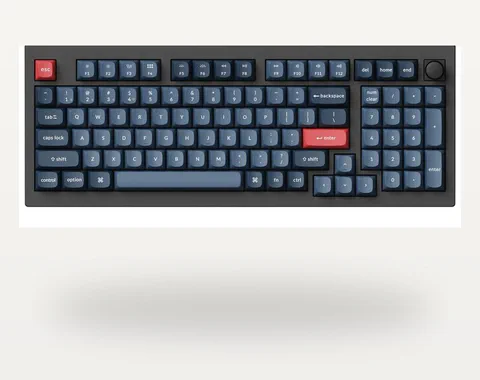
Keychron V5 Max
The less glamorous Keychron that will make more financial sense for many people: useful layout, tri-mode wireless and customization without the Q-series price.
- 96%
- Plastic case
- Tri-mode
- Hot-swap
The Keychron V5 Max is the less glamorous board that makes a lot of practical sense.
At the May 20 check, Keychron showed V5 Max variants from $99.99 to $119.99 depending on configuration. You give up the Q-series aluminum body, but you keep a lot of the functional appeal: QMK/VIA-style customization, 2.4GHz/Bluetooth/wired modes, hot-swap, a compact numpad layout and a price that feels less like buying desk jewelry.
This is the board I would look at if you want the Keychron logic without the Q1/Q5 Max price. It is also a cleaner recommendation for many office buyers than a pure gaming board. Not everyone needs magnetic switches. Many people need a keyboard that remaps well and does not waste desk space.
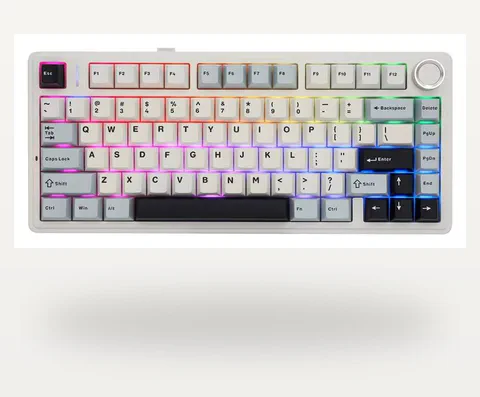
Best Budget Feel: EPOMAKER x AULA F75
EPOMAKER x AULA F75
The cheap board with the expensive-feeling sound. It is the fun value pick, as long as you buy it where returns and support are not a guessing game.
- 75%
- Gasket
- Tri-mode
- Hot-swap
The EPOMAKER x AULA F75 is the budget board people keep bringing up because it hits the dopamine button hard. It is a 75% gasket wireless mechanical keyboard, and the May 20 official-page check showed common ANSI variants around $79.99 when in stock. The typical street conversation around it is simple: “How is this so cheap?”
The F75 is attractive because it gives a soft, full, prebuilt-custom feel without making a first-time buyer learn how to lube stabilizers on a Saturday night. It is the board I would consider for someone who wants a good-sounding compact keyboard around the under-$100 class.
The warning matters. Budget boards can bring firmware confusion, layout mismatches, inconsistent seller support and software that feels less polished than the hardware. Use a return-friendly seller, download firmware only from official pages, and do not update anything on day one unless the board has a real problem.
Enthusiast step-up note: if you like the F75 idea but want a heavier aluminum custom-style board, compare it with niche options such as Rainy 75 or WOBKEY Crush 80 Reboot. At the June 9 check, those official pages sat above the AULA budget lane, so treat them as step-up alternatives rather than under-$100 replacements.
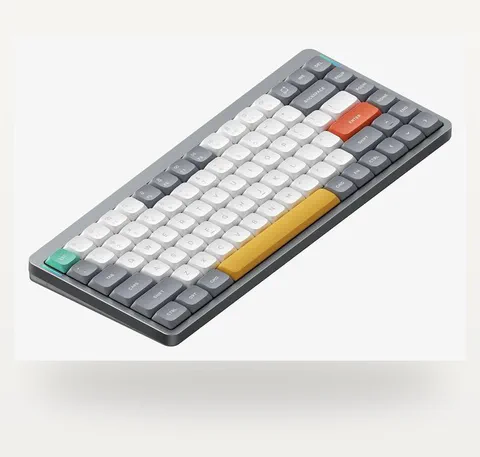
Best Low-Profile Travel Pick: NuPhy Air75 V2
NuPhy Air75 V2
The portable pick for laptop desks and Mac setups. It keeps mechanical feel while reducing keyboard height and bag bulk.
- Low-profile
- 75%
- Tri-mode
- QMK/VIA
The NuPhy Air75 V2 is for the person who wants mechanical feel without a tall desk brick.
NuPhy’s official page lists a low-profile mechanical design, 1000Hz polling, tri-mode connections, Windows/macOS/Linux compatibility and QMK/VIA customization. That makes it a strong fit for laptop users, Mac users, travel setups and desks where wrist angle matters.
Low-profile boards are not magic. They feel different, often with shorter travel and less of the full-height custom-board sound. But if your keyboard moves between rooms, laptops or bags, lower height and lighter carry matter more than acoustic purity.
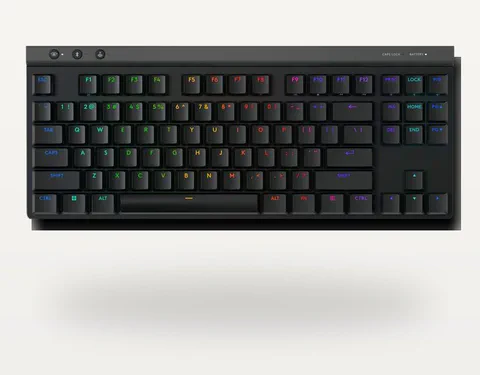
Best Mainstream Low-Profile Option: Logitech G515 LIGHTSPEED TKL
Logitech G515 LIGHTSPEED TKL
The safer mainstream pick if you want low-profile wireless gaming, easy U.S. retail support and you already live comfortably inside Logitech's ecosystem.
- TKL
- Low-profile
- LIGHTSPEED
- G HUB
The Logitech G515 LIGHTSPEED TKL is not the keyboard hobby’s most romantic answer. That is part of the point.
At the May 20 check, Logitech’s official U.S. page showed the wireless G515 LIGHTSPEED TKL at $159.99. It is a low-profile TKL gaming keyboard aimed at people who want a cleaner, thinner board with mainstream retail support and Logitech’s ecosystem.
Pick it if you already like Logitech gear, want a low-profile gaming board, and value easy U.S. retail availability. Skip it if you want open firmware, deep enthusiast customization or the fullest typing sound for the money.
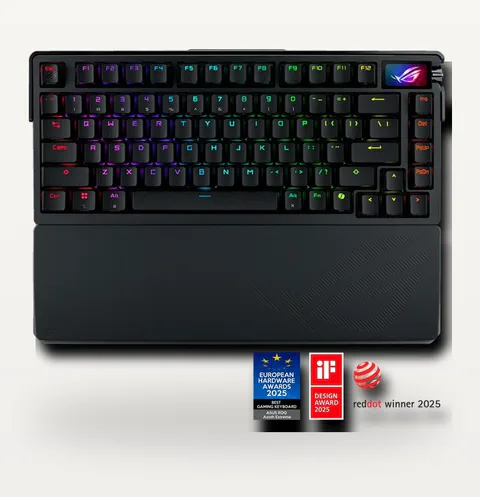
Luxury Caution: ASUS ROG Azoth Extreme
ASUS ROG Azoth Extreme
A premium object more than a default recommendation. It belongs on the page because it shows where the market gets wild.
- 75%
- Aluminum
- OLED
- $499.99 class
The ROG Azoth Extreme is the board to admire before asking whether you actually need it.
ASUS lists an estore price starting at $499.99, with a long accessory bundle, polling-rate booster, wrist rest, switch tools, extra switches and other premium details. The hardware is impressive. The price is also high enough that it competes with serious custom builds and multiple excellent prebuilt keyboards.
I would not put it in a normal buyer’s cart unless the buyer specifically wants the ROG object, the screen/control features and the premium package. At this price, “nice” is not enough. It needs to make you grin every time you sit down.
The Comparison That Actually Matters
| Model | Best use | Price cue | Main advantage | Reason to skip |
|---|---|---|---|---|
| Keychron Q1 Max | Premium everyday typing, work, mixed gaming | $189.99-$229.99 family checked May 20 | Aluminum 75%, tri-mode, hot-swap, QMK/VIA-style control | Too heavy or pricey if you only need basic typing |
| Wooting 80HE | Competitive FPS, rhythm games, actuation tuning | $199.99-$219.99 family checked May 20 | Hall Effect, Rapid Trigger, mature Wootility software | Overkill if you do not use gaming features |
| Keychron Q5 Max | Numpad users who still want premium build | $199.99-$239.99 family checked May 20 | Full-metal 96% layout with wireless and acoustic tuning | Large and expensive if numpad use is rare |
| Keychron V5 Max | Mid-range value with compact numpad | $99.99-$119.99 family checked May 20 | Useful layout, tri-mode, customization without Q-series price | Plastic case lacks Q-series heft |
| EPOMAKER x AULA F75 | Budget sound and feel under $100 class | Around $79.99 for common ANSI variants at May 20 check | Gasket 75%, prebuilt custom feel, tri-mode wireless | Software, firmware and seller support can be messier |
| NuPhy Air75 V2 | Low-profile Mac/laptop/travel setups | $100-$130 class depending sale | Thin mechanical design, QMK/VIA, tri-mode connection | Not the deepest full-height typing sound |
| Logitech G515 LIGHTSPEED TKL | Mainstream low-profile wireless gaming | $159.99 official U.S. page checked May 20 | Low-profile polish, retail support, Logitech ecosystem | Less open/custom than enthusiast boards |
| ROG Azoth Extreme | Luxury ROG setup, premium object buyers | $499.99 official U.S. page checked May 20 | Premium materials, bundled extras, high-end feature set | Price is hard to justify for normal buyers |
If you are rebuilding a whole desk instead of just replacing the keyboard, the nearby choices matter too. A loud board can leak into calls, a tiny laptop can make you crave a full desk, and a fast external drive can matter more than another layer of RGB. The related rabbit holes: studio and work headphones, MacBook Air buying choices and the Ziyoulang K6 manual page if you are trying to decode pairing, lights and function-layer behavior on a budget board.
Switches, Noise and Feel
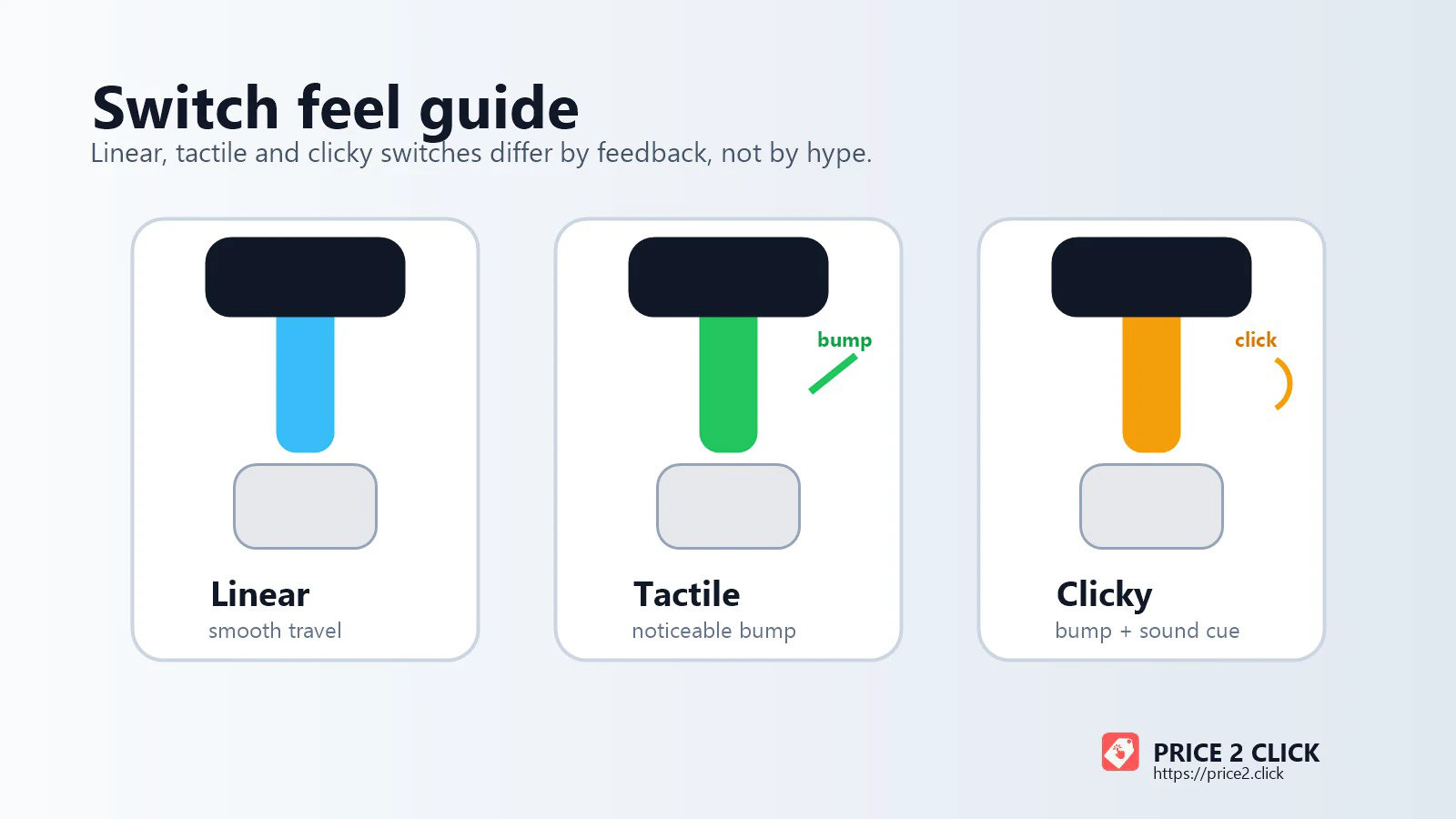
Linear switches are smooth from top to bottom. They are common in gaming keyboards because they make repeated presses feel easy and predictable. They can also be quiet-ish, though the board’s case, keycaps and stabilizers matter as much as the switch.
Tactile switches add a bump. For typing, that bump can help you feel the actuation point without needing a loud click. Brown-style switches are the famous mild version, but modern tactile options can be much sharper or smoother.
Clicky switches add a bump and a sound mechanism. They can be satisfying in a private room. In an office, shared apartment or voice chat, they can make you the villain of a very small story. If other people have ears nearby, ask before buying clicky.
Silent switches are not truly silent. They reduce the bottom-out and top-out sound with dampening material. That can make them feel a little softer or mushier, but for shared rooms they can be a blessing.
Hall Effect switches use magnetic sensing rather than a normal metal-contact actuation point. Their real advantage is not “faster because magnets.” The real advantage is control: adjustable actuation, fast reset, analog behavior and software features like Rapid Trigger. That is fantastic for gaming and not automatically better for long writing sessions.
Sound words need translation too. “Thock” usually means a deeper, rounder sound; “clack” means a brighter, sharper sound. The switch matters, but the case, plate material, foam, keycaps, stabilizers and desk mat can change the sound just as much. Treat the sound samples above as a family preview, then check return terms if acoustic feel is the reason you are buying.
Common Problems and Fixes
Great in a private room, risky in an office or shared space. Buy tactile or silent switches if other people work near you.
Boards like the AULA F75 can be excellent values, but verify the exact model, layout and official firmware source before updating anything.
Use 2.4GHz or wired for games. Bluetooth is for convenience, battery life and multi-device switching.
Do not assume every game, server or tournament allows input-assist features. Use separate profiles and check current rules.
If you do not use the numpad every day, TKL, 75% or 80% will usually feel better on a normal desk.
If a board depends on a heavy vendor app for basic behavior, think twice. Onboard memory and open-style remapping are safer long-term bets.
Before You Pay: Match the Exact Listing
Use these May 20 price cues to spot obvious overpaying, then slow down before checkout. A mechanical keyboard listing can change by switch, color, layout, barebone/assembled kit, wireless receiver, warranty region and seller condition.
Before you pay, match five things: the exact layout you want, the switch type, the connection mode, the return window and the firmware/support page you will use if something goes wrong. If you are outside the U.S., check ANSI versus ISO too: ANSI has the wide one-row Enter key, while ISO is the common European layout with a taller Enter. The wrong layout can make replacement keycaps and local muscle memory annoying.
10-second regret check before checkout
- Hot-swap: can you replace a bad switch without soldering?
- Layout: is it the ANSI or ISO layout you actually want, with a standard bottom row for future keycaps?
- Onboard memory: will remaps, lighting and layers survive without the vendor app running?
- Sound: will this switch/case profile be acceptable for calls, roommates or office use?
- Support path: is there an official firmware page, a return window and a seller you trust?
Price discipline matters because keyboard listings can be messy. A cheap listing may be a different switch, old revision, non-U.S. layout, open-box unit or seller with a painful return window. Match layout, switch, connectivity, condition, warranty and support path before treating anything as a deal.
What I Would Avoid
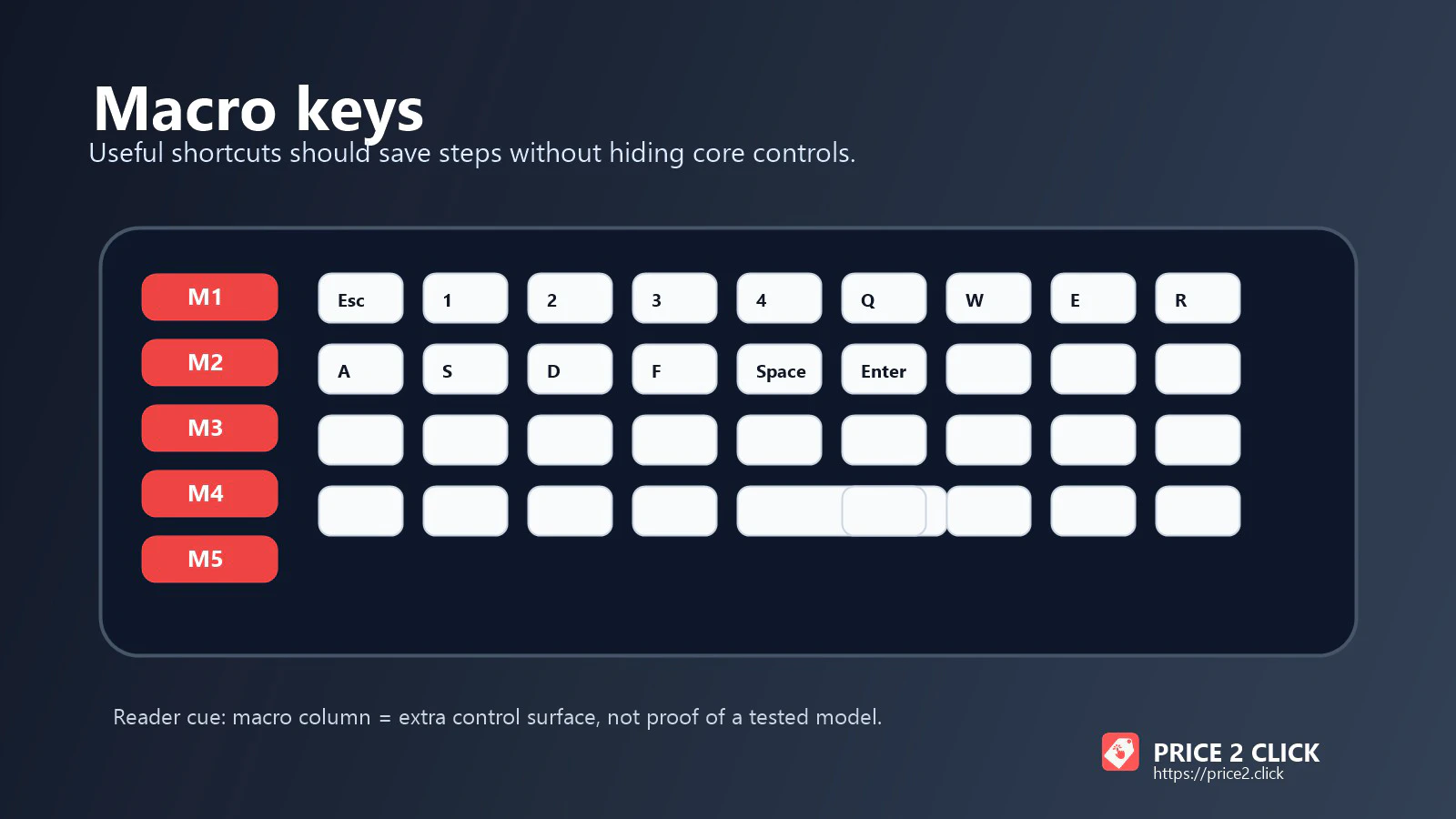
I would avoid huge boards unless the extra keys earn their space. A numpad is useful. Twenty macro keys you never touch are desk clutter with RGB.
I would avoid clicky switches for offices, dorm rooms and shared apartments. The sound can be delightful for the person typing and deeply irritating to everyone else.
I would avoid buying Hall Effect boards for vague future-proofing. If you play competitive games and will tune actuation, great. If you write, code, shop and answer email, a good traditional mechanical board can feel better.
I would avoid mystery-brand boards with no official firmware page. Hot-swap and gasket mount are nice. A support dead end is not.
I would avoid luxury boards at full price unless the object itself is part of the joy. There is nothing wrong with wanting the premium thing. Just do not pretend a $500 keyboard is the practical default.
FAQ
Are Hall Effect keyboards better than mechanical keyboards?
They are better for specific gaming controls, especially adjustable actuation and Rapid Trigger. They are not automatically better for typing. Traditional mechanical switches still offer more variety in tactile feel, sound and customization.
What keyboard size should most people buy?
Most people should start with TKL, 75% or 80%. Those layouts keep important keys while freeing mouse space. Buy full-size or 96% only if you use a numpad daily.
Are budget mechanical keyboards worth it in 2026?
Yes, but buy them with a return plan. Boards like the AULA F75 can feel far more expensive than they are, but software, firmware, seller support and layout variants are the tradeoff.
What switch should I choose for an office?
Start with quiet tactile, silent linear or a well-damped linear switch. Avoid clicky switches unless everyone near you has explicitly agreed to the soundtrack.
Is wireless okay for gaming?
Good 2.4GHz wireless is fine for most gaming. Bluetooth is the wrong mode for latency-sensitive games. If you compete seriously, use 2.4GHz or wired and verify the board’s polling and latency behavior from independent tests.
Do I need QMK or VIA?
You do not need it, but it is useful. QMK/VIA-style configuration lets you remap keys, set layers and keep settings on the keyboard without relying as much on a vendor app.
Bottom Line
If I were buying one premium mechanical keyboard today, I would start with the Keychron Q1 Max and check live stock, switch options and return terms. It is not the fastest gaming board or the cheapest good board. It is the cleanest all-rounder.
If gaming performance is the whole point, buy the Wooting 80HE and learn the software properly. If value is the point, compare Keychron V5 Max against AULA F75 and decide whether safer firmware or cheaper sound matters more. If low height matters, look at NuPhy Air75 V2 or Logitech G515.
The trick is not finding the loudest recommendation. It is finding the board whose compromises match your desk.
Shopping note: prices and availability can change quickly. Check the exact model, seller, condition, warranty, and return window before buying.